
Business process automation that takes the load off your team
We design and implement automation solutions that truly lighten the load on your sales, marketing, customer service, and operations teams. We integrate systems, streamline data flow, and leverage AI where it actually speeds up work.
We start by understanding the process and the business objective. Then we identify what should be automated, implement the solution, and prepare the team to use it effectively on a daily basis.
When Should You Automate Processes in Your Company?
Automation makes sense when repetitive tasks take up time and the flow of information depends on manual data transfer and reminders. It’s a good idea to start with areas where your team regularly wastes time or makes mistakes.
Sound familiar?
You enter the same data multiple times
Information from a form ends up in the CRM, a spreadsheet, and the ordering system. Each subsequent entry takes time and increases the risk of error.
You have to search through messages for details
The scope of the order is in an email, the deadline is in a chat, and the note from the call is with the sales rep. Before moving on to the next step, someone has to gather all this information.
Tasks get stuck between departments
The contract is signed, but the implementation team lacks all the necessary data. The team is trying to figure out who’s taking over the case and what to do next.
One person keeps track of deadlines
Reminders about follow-ups and overdue tasks depend on the employee’s memory. When they’re away, cases start to fall behind.
Which process should we start with?
Together, we check four things:
Frequency
How often does the team perform the same tasks?
Work Time
How much time do they take on a weekly or monthly basis?
Consequences of Errors
What is the cost of a mistake, a delay, or a missed issue?
Clear Rules
Do we know what triggers the process, who makes the decisions, and how to handle exceptions?
When the rules are unclear, we start by organizing the process.
For the first phase, we select a specific problem.
We establish a starting point and a way to measure the outcome: processing time, the number of manual steps, or the number of errors.
What business processes can we automate?
Automation can cover a single task or several stages of work across departments. We design it around the information and actions needed to handle a specific case. Below are examples of areas that we tailor to your company’s systems and operating principles.
Marketing and lead handoff to sales
An inquiry submitted via a form should be routed to the right person, along with information about what the customer needs and where they came from. We can combine data collection with verification, recording in the CRM, assigning a account manager, and creating a task.
We also define what should happen when a contact already exists or when data is missing to process the inquiry. The sales representative receives the case with its context, and the marketing team can track what happens to the referred contacts.
Sales, Offers, and Follow-Up with the Customer
After the conversation, you need to complete the data, prepare an offer, and determine the next step. Some of these actions can be triggered based on the transaction stage or the sales representative’s decision.
We can set up data flows for quotes, follow-up reminders, and alerts for items requiring no further action. Discounts, custom terms, or sending a document may require approval from a designated person.
Customer Service, Support Tickets, and Response Times
A ticket can be assigned a category, an assigned agent, and a response time according to agreed-upon rules. The team can view the case history, and the person responsible is notified when the case requires intervention.
Automation can also send reminders about missing data, forward the case to another department, and notify the customer of a status change. We define the scope of communication for each type of request.
Contract workflow, handoff for execution, and operations
A signed contract can trigger the preparation of a project, tasks, or a purchase order in the next system. The client’s data, the agreed-upon scope, and the documents are forwarded to the individuals responsible for execution.
Before handoff, the system checks the required information. If anything is missing, it flags the issue for completion. This ensures that the next department knows what to do and who is responsible for addressing any gaps.
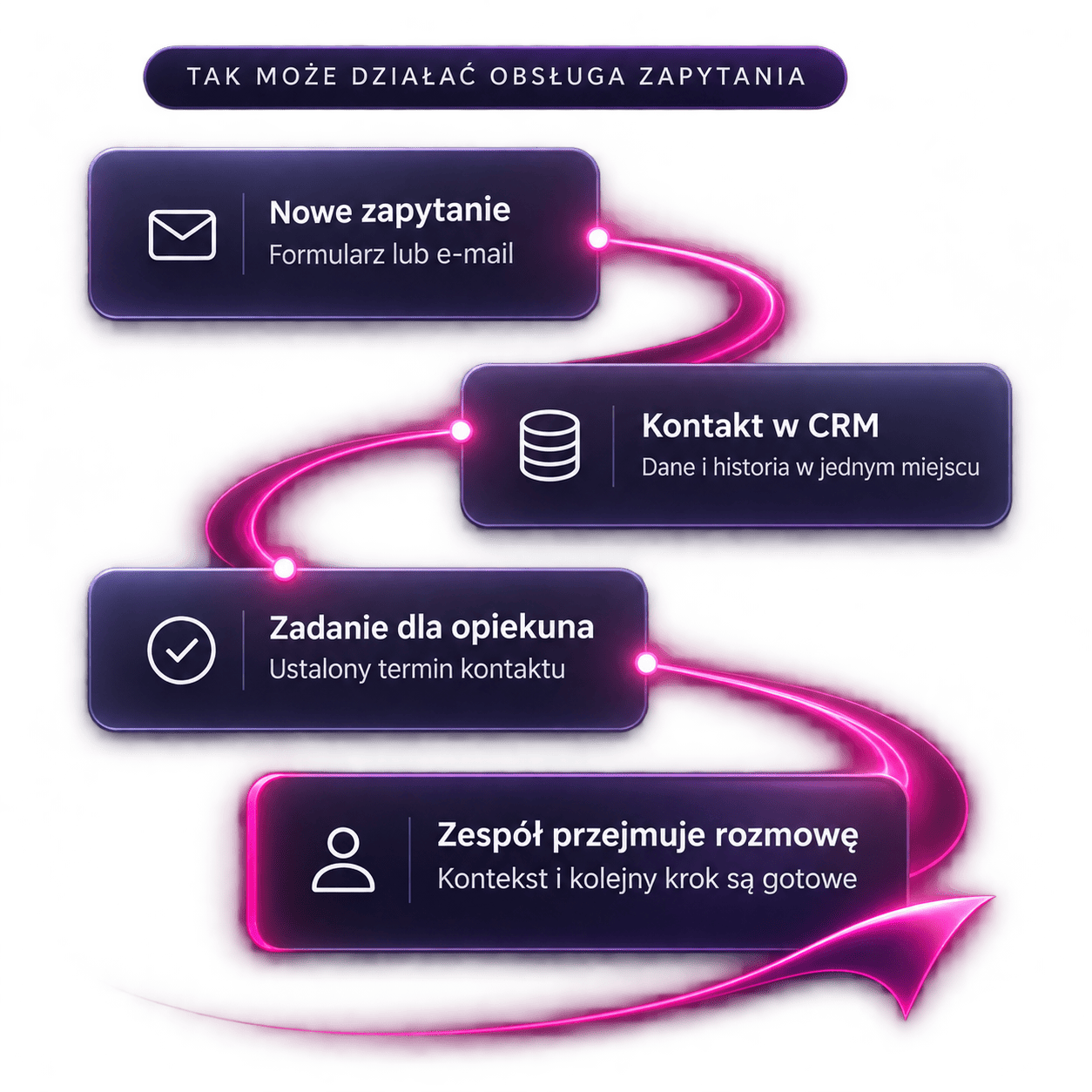
From Inquiry to Completion — An Example of Full-Process Automation
In a service-based company, a single inquiry may pass through marketing, sales, and fulfillment. The scenario below shows how these departments can work together. This is an example of a process whose details we finalize during the analysis.
The inquiry is sent to the CRM
After the form is submitted, the system checks whether the contact already exists and saves the information to the appropriate record. Any missing data is flagged for completion.
A sales representative is assigned the case
Assignment rules take into account, for example, the type of service or service area. The assigned representative receives a task with a deadline and the content of the inquiry. Failure to act within the agreed-upon timeframe may trigger a notification.
The details from the conversation are incorporated into the offer
The sales representative confirms the scope and terms. The agreed-upon details can be used to prepare the document, and the proposal goes through the required approvals before being sent.
Signing the contract triggers the handoff
Upon receiving confirmation from the signature system, the automation checks the data for completeness. It then creates the agreed-upon tasks or project and notifies the implementation team.
The team begins work with the complete set of arrangements
The person in charge sees the scope, documents, and deadlines. The handoff result is returned to the CRM, so the sales team can verify that the case has been accepted.
If conditions change, data is missing, or one of the systems fails to respond, the process requires a separate workflow. We determine when it should be paused, who will be notified, and how to resume processing.
Velmanty Solutions in Practice
We develop integrations and custom components for automation. Examples include our SMSAPI solutions for HubSpot and n8n: we use the same communication channel across different work environments.
Customer
customer
HubSpot
SMSAPI
IntegrationSent
message
Integration visualization
SMSAPI and HubSpot — message triggered from a process
Our integration allows you to send SMS messages from a HubSpot workflow, personalize their content with CRM data, and save the sent message to the corresponding record.
You can use it in a predefined scenario for reminders or communication regarding a customer case. The team works with data in the CRM, without having to manually export a recipient list to a separate dashboard.
See the SMSAPI integration with HubSpot ↗Custom SMSAPI node for n8n
We’ve also developed our own node—an SMSAPI integration component for n8n. It allows you to send SMS messages directly within an automation workflow.
We develop such components when a company needs convenient access to the operations of an external system. We tailor the scope of the integration to the available API and process requirements.
See how we use n8n and our custom integrations ↗n8n
SMSAPI
Integration Visualization
How do we design, implement, and develop automation solutions?
We begin the implementation by defining workflows, data, and responsibilities. Based on this, we determine the scope, select the technology, and agree on how we’ll verify that the solution is working correctly.
Process Analysis and Initial Scope Definition
We talk to the people performing the tasks and review the systems in use. We determine what triggers the process, what data is needed, who makes decisions, and where exceptions occur.
You’ll receive a process description, the recommended initial scope, and the dependencies that must be considered before implementation. On your end, we need a person responsible for the process and the involvement of its users.
System Integration and Automation Development
We determine which system stores specific data and how we transfer it. We configure workflows, business rules, and the necessary integrations. If an off-the-shelf integration doesn’t cover the required scope, we explore the possibility of developing a custom component.
We leverage the capabilities of existing tools, n8n, or custom code, depending on the requirements. When working with the content of messages, documents, and conversations, we can incorporate AI, along with rules for verifying its results.
Testing, Data Security, and Team Preparation
We check the normal workflow, missing data, duplicate events, and integration errors. Together, we establish permissions, the scope of processed information, and the procedure for reporting issues.
Users go through their tasks in the new process. They receive instructions and know when their decision is needed. Before launch, we confirm the agreed-upon acceptance criteria.
Launch, Maintenance, and Further Development
After launch, we monitor the process flow and compare the results with the baseline. We document the automation’s operation, dependencies, and exception handling procedures.
We agree on responsibilities for maintenance, monitoring, and updates. We plan further changes based on the solution’s performance and the team’s needs. The scope of post-implementation support is specified in the proposal.
How much does process automation cost, and how can you assess its cost-effectiveness?
Project-Based Pricing
We provide project-based pricing for automation solutions after determining the scope. The cost is primarily influenced by the number and capabilities of the systems, data quality, the complexity of the rules, and the number of situations requiring separate handling.
The volume of operations, the method of solution deployment, and the required scope of maintenance also play a role. We itemize the implementation cost, fees for tools and the environment, and agreed-upon support separately. When using AI, we also factor in the cost of its use.
Implementation
Tools and Environment
Agreed-upon support
How do we determine if an investment makes sense?
Before implementation, we determine how much time the process takes, how often it’s performed, and where errors occur. This data shows which changes can deliver the greatest value.
For example, when handling inquiries, the metric might be the time to first contact. For document workflows, we examine the number of manual entries and cases that need to be corrected. After launch, we compare the same scope and the same metrics.
The time saved can be allocated to customer service or handling a greater number of cases. When assessing cost-effectiveness, we consider how this time is utilized as well as the ongoing cost of operating the automation system.
Questions to Consider Before Implementing Automation
FAQ
Let’s see which process should be streamlined first
Describe what you do manually, what systems you use, and where things get stuck. During our first conversation, we’ll discuss your goal, possible approaches, and the information needed for a quote. If a separate process analysis is needed, we’ll outline its scope and cost before starting work.